PeopleSoft applications are helping to make paper and email-based forms a thing of the past so that you will know what was submitted, when it was submitted, and who approved it. We recently released Forms and Approval Builder as a part of Common Components 9.1. Forms and Approval Builder allows you to build electronic forms that are configurable by business analysts, enabled with approval workflows, and immediately deployable and auditable to enable you to replace paper and email-based forms. Forms and Approval Builder is currently available, at no additional charge, to all PeopleSoft 9.1 customers. It was part of the FSCM Feature Pack March 2011, and it is also available in the Enterprise Components 9.1 Common Objects Bundle 1 2011 for use in any PeopleSoft 9.1 Pillar, including, of course, HCM. It does require PeopleTools 8.51.03 or greater.
Form Design
PeopleSoft Forms and Approval Builder enables business analysts to create electronic, routable forms without having to use PeopleSoft Application Designer. A typical form can be designed and in use within 30 minutes and requires no writing of code.
The intuitive wizard guides you step by step through establishing a form. Options include adding instructions to the form, similar to what you would find on the back of a paper form; adding attachments to the form for users to read, submit, or both; and being able to create your own fields on the form. These fields can be plain text, numbers, date and time, yes/no, fields that prompt against existing PeopleSoft records, and code fields. The code field type enables you to build a list of items on the fly that a person who is filling in the form can select from when perusing the drop-down list. You can create these user prompt values in the code fields without having to enter them in a standard PeopleSoft record beforehand.
Main Menu > Forms > Design a Form
Fields can be organized into one or two columns on the page, and every field on the form has the option of being made required to ensure that users thoroughly complete the form.
You specify the location of the form in the PeopleSoft Main Menu through an easy-to-navigate folder hierarchy, and you select the flow of approvers that the form will follow using the approvers from within the Approval Workflow Engine.
There is also the ability to make forms available for limited periods of time.
Efficient and Effective Forms Management for your Organization
Knowing how many of each type of form are in the system and their approval status is essential in monitoring your business processes. PeopleSoft Forms and Approval Builder comes with its own summarization table, enabling you to see at a glance how many forms of each type have been created and how many forms are in each approval status. This central Form Management repository also enables you to activate and deactivate your forms within the system in one place, eliminating the need to go back into the design of each form and activate it.
The ability to find a particular form in an instant is also important in supporting efficient operations. Forms are searchable by subject, form type, priority, due date, and approval status to eliminate the need for searching through piles of paperwork.
Easy to Navigate Forms Available to Your Users When they Need Them
Any given form may be accessed through either the central forms repository or the link you designate for it in within the PeopleSoft Menu navigation. Users open a blank form; enter the required information; download, read, fill in, and upload attachments; and submit their form for approval.
Forms are available to the approver instantly, and approvals are also available as soon as they are granted.
Finally, because the Forms and Approval Builder utilizes the existing infrastructure of the Approval Workflow Engine and the Supplemental Data Framework, your forms and approvals are migrated like all other application data during an upgrade between PeopleSoft Releases.
Hi PeopleTools 8.52 - Support the Restful web services. I was just wondering what is this Restful which generates WADL vs WSDL.
I found some of the interesting post/documents that expain SOAP/WSDL and Restful/WADL.
Document provides the detail differences between the WSDL and WADL.how they are different from the WSDL 2.0.
http://public.dhe.ibm.com/software/dw/specs/ws-wadlwsdl/WADLWSDLpaper20080621.pdf
http://www.ajaxonomy.com/2008/xml/web-services-part-1-soap-vs-rest
WADL and WSDL 2.0 HTTP binding are similar but do have some differences. Each
specification has both its pros and cons. In short, WADL is simple and has limited scope. By
design, WADL is limited to describing HTTP applications and does not address features such
as security. On the other hand, the WSDL 2.0 HTTP binding is more feature rich, at the cost
of increased complexity, yet still lacks a true resource-centric model.
It will be interesting to watch as each of these technologies matures and gains broader
adoption.
Webserivces are one of the best methods to communicate 2 systems. Data is transmitted between the system over the network needs to be safe. Webservices security is very important.
Here are some of the links that will be useful for implementing the webservice security. Later I will post the detailed steps for the implementing the webservice security.
Oracle Support documents
E-IB: How to Implement WS Encryption for Inbound Web Services Security (Doc ID 661275.1)
E-IB: How to Setup Inbound WS-Security Processing Using SAML Token in Integration Broker (Doc ID 1322740.1)
E-PORTAL: WSRP Red Paper For PeopleTools 8.49-8.50 (Doc ID 1073454.1)
E-SEC: Does Peoplesoft Support the Securty Assertion Markup Lanuage (SAML) Directly? (Doc ID 623055.1)
PeopleBook Links
Home > PeopleBooks > Enterprise PeopleTools 8.50 PeopleBook: Integration Broker Administration > Setting Up Secure Integration Environments > Understanding WS-Security Processing using SAML Tokens
Home > PeopleBooks > Enterprise PeopleTools 8.50 PeopleBook: PeopleTools Portal Technology > Configuring WS-Security For WSRP Consumption and Production > Determining Security Requirements
Home > PeopleBooks > Enterprise PeopleTools 8.50 PeopleBook: Integration Broker Administration > Setting Up Secure Integration Environments > Understanding WS-Security Processing using SAML Tokens
Home > PeopleBooks > Enterprise PeopleTools 8.50 PeopleBook: Integration Broker Administration > Setting Up Secure Integration Environments> Understanding WS-Security Processing using Username Tokens
Prerequisites for Implementing WS-Security in PeopleSoft Integration Broker Implementing WS-Security for Inbound Integrations (Username Tokens)
Backgroud :
Find out about ReCAPTCHA here :-
http://en.wikipedia.org/wiki/ReCAPTCHA
CAPTCHA :-
http://en.wikipedia.org/wiki/CAPTCHA
You can use this for the forgot password component , carrer login page (applicant login) or any other similar pages strighat way.
Following are modified steps from the reCAPTCHA website for the PeopleSoft Implementation.
First, go to
the reCAPTCHA web site and create an account. As part of that account creation process you'll have to specify the domain your reCAPTCHA will be protecting. The reCAPTCHA site will will give you a key pair for that domain. The key pair allows you to authenticate your reCAPTCHA requests to the reCAPTCHA servers
Second, Create the HTML Area in the PeopleSoft page where you want the ReCaptcha to apper
in the HTML Defination add the follwing Java script code, you need to enclose it with form tags.
make sure you replace
- with the public key from the key pair created in reCaptcha website.
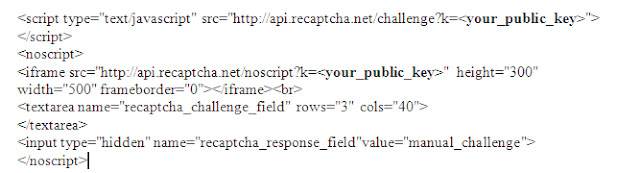
Download the Java API library in the following location
http://code.google.com/p/recaptcha/downloads/list?q=label:java-Latest - Place the jar file in the class path/folder for the java in the appserver.
Add button on the page, similar to submit button for the page, on field change of the button you can write the code as below.
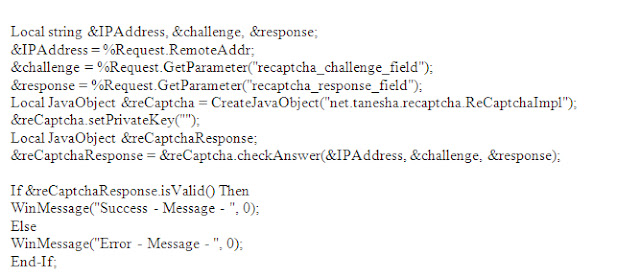
PS: Make sure you replace the private in code with the private key generated by reCaptcha for your domain.
Hope this will be helpfull.
People HR application has evolved with each version and there was major change in the Personal model. Most of us know what are the major changes in personal model. Some time finding all the detail changes and to understand and back data from old versions during upgrade and re-implementation is a challenge.
We do have details in the people books, It has not evolved as much as application find things on people books is not that friendly. I found one of link hosting the details of the changes hope this will be useful for you as well.
http://www.acs.utah.edu/acs/systems/ps8/CampusSolns/CS_Docs/appdocs/ucs801_8926.htm
There was several solutions to find the navigation path for component and page. There were several SQL statements for different databases. Finally Oracle as developed page this purpose.
In the latest Ptools 8.50 and Application 9.1 application search is possible from two navigations.
1) Main Menu > Enterprise Components > Find Object Navigation
2) Setup HRMS > System Administration > Utilites > Portal Navigation Path
Search is possible with name of Component,Page,Secondary Page and Content Reference.
Search works fine with hidden components as well.
FIXED format
Be careful when you change the length or starting position of any file fields, or if you insert a new file field between two existing ones. It’s possible to overlay fields. Results are unpredictable.
When you insert a record into a file layout, fields of type Long are converted to type Character, with a length of 0. You must set a field length greater than 0 before you can save the file layout.
CSV format
• Both the qualifier and the delimiter accept a blank as a valid value.
• If a field is NULL, you don't have to use qualifiers. In the following example, Field2 is NULL.
Field1,,Field3,Field4. .
XML Format
• Your XML input file must contain at least the fields that are specified in the file layout definition you’re using. If the file is missing any fields, the input rowset won’t contain any data.
• If your XML input file contains extra fields that aren’t specified in the file layout definition, the ReadRowset method will ignore the extra fields.
• When you insert a record into a file layout, fields of type Long are converted to type Character, with a length of 0. You must set a field length greater than 0 before you can save the file layout.
Get glimpse of UI enhancements in People Tools 8.51. Best just got better.
People Tools 8.51 has new interesting feature – Test framework as part of people tools objects.
It will be an interesting feature for Testing/Functional and Development teams.
Find out how it works - demo videos.
1) Part 1 http://www.youtube.com/watch?v=hY_q82hpcks
2) Part 2 http://www.youtube.com/watch?v=kIK3QsPTPOU
3) Part 3 http://www.youtube.com/watch?v=aRmpusoAN5E


 Posts


