Hi PeopleTools 8.52 - Support the Restful web services. I was just wondering what is this Restful which generates WADL vs WSDL.
I found some of the interesting post/documents that expain SOAP/WSDL and Restful/WADL.
Document provides the detail differences between the WSDL and WADL.how they are different from the WSDL 2.0.
http://public.dhe.ibm.com/software/dw/specs/ws-wadlwsdl/WADLWSDLpaper20080621.pdf
http://www.ajaxonomy.com/2008/xml/web-services-part-1-soap-vs-rest
WADL and WSDL 2.0 HTTP binding are similar but do have some differences. Each
specification has both its pros and cons. In short, WADL is simple and has limited scope. By
design, WADL is limited to describing HTTP applications and does not address features such
as security. On the other hand, the WSDL 2.0 HTTP binding is more feature rich, at the cost
of increased complexity, yet still lacks a true resource-centric model.
It will be interesting to watch as each of these technologies matures and gains broader
adoption.
Webserivces are one of the best methods to communicate 2 systems. Data is transmitted between the system over the network needs to be safe. Webservices security is very important.
Here are some of the links that will be useful for implementing the webservice security. Later I will post the detailed steps for the implementing the webservice security.
Oracle Support documents
E-IB: How to Implement WS Encryption for Inbound Web Services Security (Doc ID 661275.1)
E-IB: How to Setup Inbound WS-Security Processing Using SAML Token in Integration Broker (Doc ID 1322740.1)
E-PORTAL: WSRP Red Paper For PeopleTools 8.49-8.50 (Doc ID 1073454.1)
E-SEC: Does Peoplesoft Support the Securty Assertion Markup Lanuage (SAML) Directly? (Doc ID 623055.1)
PeopleBook Links
Home > PeopleBooks > Enterprise PeopleTools 8.50 PeopleBook: Integration Broker Administration > Setting Up Secure Integration Environments > Understanding WS-Security Processing using SAML Tokens
Home > PeopleBooks > Enterprise PeopleTools 8.50 PeopleBook: PeopleTools Portal Technology > Configuring WS-Security For WSRP Consumption and Production > Determining Security Requirements
Home > PeopleBooks > Enterprise PeopleTools 8.50 PeopleBook: Integration Broker Administration > Setting Up Secure Integration Environments > Understanding WS-Security Processing using SAML Tokens
Home > PeopleBooks > Enterprise PeopleTools 8.50 PeopleBook: Integration Broker Administration > Setting Up Secure Integration Environments> Understanding WS-Security Processing using Username Tokens
Prerequisites for Implementing WS-Security in PeopleSoft Integration Broker Implementing WS-Security for Inbound Integrations (Username Tokens)
Backgroud :
Find out about ReCAPTCHA here :-
http://en.wikipedia.org/wiki/ReCAPTCHA
CAPTCHA :-
http://en.wikipedia.org/wiki/CAPTCHA
You can use this for the forgot password component , carrer login page (applicant login) or any other similar pages strighat way.
Following are modified steps from the reCAPTCHA website for the PeopleSoft Implementation.
First, go to
the reCAPTCHA web site and create an account. As part of that account creation process you'll have to specify the domain your reCAPTCHA will be protecting. The reCAPTCHA site will will give you a key pair for that domain. The key pair allows you to authenticate your reCAPTCHA requests to the reCAPTCHA servers
Second, Create the HTML Area in the PeopleSoft page where you want the ReCaptcha to apper
in the HTML Defination add the follwing Java script code, you need to enclose it with form tags.
make sure you replace
- with the public key from the key pair created in reCaptcha website.
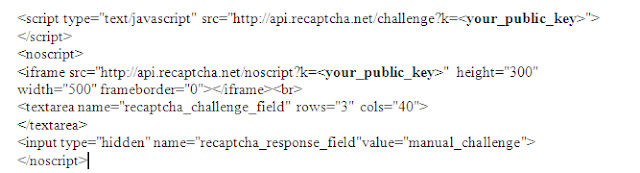
Download the Java API library in the following location
http://code.google.com/p/recaptcha/downloads/list?q=label:java-Latest - Place the jar file in the class path/folder for the java in the appserver.
Add button on the page, similar to submit button for the page, on field change of the button you can write the code as below.
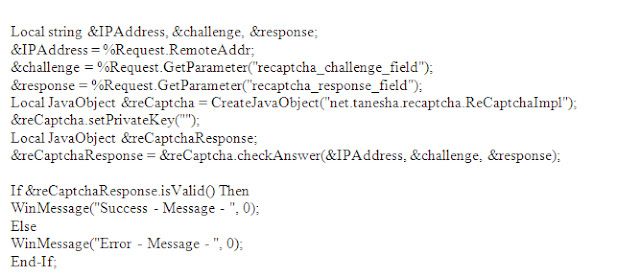
PS: Make sure you replace the private in code with the private key generated by reCaptcha for your domain.
Hope this will be helpfull.
VERITY Search Engine, PORTAL_INDEX process, Building a Search Index and Searching the Portal - very good post from Shyam Sundar.
http://peoplesoftwiki.blogspot.com/2010/01/verity-search-engine-portalindex.html
All about PeopleSoft Portal Registry- Shyam Sundar
Verity is needs to installed in 8.50 and HCM 9.1 version. It no long comes as product with peoplesoft installation. following link has the details to install the verity search engine.
People HR application has evolved with each version and there was major change in the Personal model. Most of us know what are the major changes in personal model. Some time finding all the detail changes and to understand and back data from old versions during upgrade and re-implementation is a challenge.
We do have details in the people books, It has not evolved as much as application find things on people books is not that friendly. I found one of link hosting the details of the changes hope this will be useful for you as well.
http://www.acs.utah.edu/acs/systems/ps8/CampusSolns/CS_Docs/appdocs/ucs801_8926.htm
There was several solutions to find the navigation path for component and page. There were several SQL statements for different databases. Finally Oracle as developed page this purpose.
In the latest Ptools 8.50 and Application 9.1 application search is possible from two navigations.
1) Main Menu > Enterprise Components > Find Object Navigation
2) Setup HRMS > System Administration > Utilites > Portal Navigation Path
Search is possible with name of Component,Page,Secondary Page and Content Reference.
Search works fine with hidden components as well.
FIXED format
Be careful when you change the length or starting position of any file fields, or if you insert a new file field between two existing ones. It’s possible to overlay fields. Results are unpredictable.
When you insert a record into a file layout, fields of type Long are converted to type Character, with a length of 0. You must set a field length greater than 0 before you can save the file layout.
CSV format
• Both the qualifier and the delimiter accept a blank as a valid value.
• If a field is NULL, you don't have to use qualifiers. In the following example, Field2 is NULL.
Field1,,Field3,Field4. .
XML Format
• Your XML input file must contain at least the fields that are specified in the file layout definition you’re using. If the file is missing any fields, the input rowset won’t contain any data.
• If your XML input file contains extra fields that aren’t specified in the file layout definition, the ReadRowset method will ignore the extra fields.
• When you insert a record into a file layout, fields of type Long are converted to type Character, with a length of 0. You must set a field length greater than 0 before you can save the file layout.
Get glimpse of UI enhancements in People Tools 8.51. Best just got better.
People Tools 8.51 has new interesting feature – Test framework as part of people tools objects.
It will be an interesting feature for Testing/Functional and Development teams.
Find out how it works - demo videos.
1) Part 1 http://www.youtube.com/watch?v=hY_q82hpcks
2) Part 2 http://www.youtube.com/watch?v=kIK3QsPTPOU
3) Part 3 http://www.youtube.com/watch?v=aRmpusoAN5E
Organizations that manage critical applications such as HR or their Supply Chain with Peoplesoft run many jobs both within the Process Scheduler as well as outside of the Peoplesoft environment. The scheduling facilities included in Peoplesoft are rudimentary and are not capable of managing workload outside of Peoplesoft making it challenging to get an end-to-end business view or to avoid manual processes that can cause outages.
ERP systems are the mainstream systems in most of the organization. Different ERP system and other system in the organization has to co-exist in the organization to support the business processes.
Business Need
- Integrate the PeopleSoft production environment with other systems
- Eliminate errors and processing delays
- Enhance the PeopleSoft built-in scheduler capabilities
- broad range of platform and application support integrate different system in the organization.
In an organization multiple batch process across different applications needs to scheduled in particular order. manage, monitor and analyze the impact of different batch process on business process is very essential.
Some of the companies use Crontab - in the unix to schedule the jobs in the PeopleSoft and other applications. It will be common place to analyze and manage scheduling. This is platform dependent and doesn't support all the process types.
There are few Scheduling softwares - Which can manage the different batch processes across different platform and applications and server as a common point to manage and monitor the different business processes. Workflow of different business process can be created with these softwares/applications.
job dependencies, workload balancing, and event-based job execution can be managed easily.
3 - Third party Schedulers that are popularly used with Peoplesoft ERP systems.
1) Unicenter Autosys
2) Control - M
3) Tivoil Work schedular
There are Peoplesoft adapters so that these schedulers can connect to Peoplesoft system.
The Adapter connects to the PeopleSoft Enterprise database and collects the data it needs to define the task. The Adapter submits the task, waits for Oracle’s PeopleSoft Enterprise Process Scheduler to finish running the task, and retrieves the status changes in the PeopleSoft Enterprise database. The status can be viewed from the Schedular Operator Console and the PeopleSoft Enterprise Process Monitor.
The integration is accomplished by inserting PeopleSoft Enterprise job or process information into various database tables that emulate a submission through the PeopleTools GUI. Once the PeopleSoft Enterprise work has been scheduled, it is monitored to completion, reflecting status changes back to the Scheduler.


 Posts
Posts


